

HELPR LLM Tools
Our HELPR (Health data Exploration Powered by AI for Research) Tools leverage AI to improve the way researchers interact with health data.
Finding, cleaning, and using health data for research is complicated. Our suite of HELPR LLM Tools make it eaiser for our AI health researchers to interact with data.
Jump to a HELPR Tool:
MiCohort Screener | MiQuery Builder Assistant
How it works
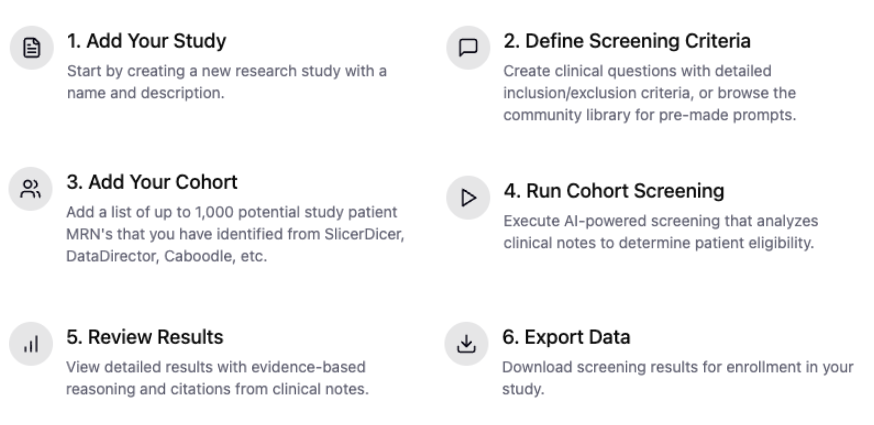
MiCohort Screener
AI-assisted chart review for clinical research recruitment.
Identifying patients who truly meet a study protocol's eligibility criteria requires reading the chart — and that has historically meant weeks of manual review by research coordinators.
Start by building your prospective cohort using DataDirect or any structured query tool, then let MiCohort Screener do the rest. Upload your patient list and the application screens each patient's chart against the protocol's inclusion and exclusion criteria using a HIPAA-approved large language model. Within minutes, your team receives a ranked, exportable screening report — with citations back to the source documentation.
MiCohort Screener:
Screens hundreds of patients against multi-criterion protocols in a single run
Uses UM GPT, U-M's institutionally hosted, HIPAA-approved LLM
Draws on the Michigan Medicine Research Data Warehouse — no new data flows or third-party dependencies
Returns per-patient eligibility determinations with model reasoning and source citations
Exports results to Excel for investigator and sponsor review
For more information, contact:
Cinzia Smothers, Director, Research Services

MiQuery Builder Assistant
This LLM will build a SQL query that you can run in the Deidentified RDW or the RDW to find the data you’re looking for.
The MiQuery Builder Assistants are powered by UMGPT and designed specifically for querying Michigan Medicine patient data. The MiQuery Builder Assistants translate natural-language research questions into DeID RDW or RDW-ready SQL queries in seconds, expanding data access to our researchers and accelerating their workflows.
Features include:
Generates SQL code based on natural language prompts.
Automatically identifies the correct RDW tables, joins, filters, and code sets required.
Understands the DeID RDW and RDW schemas.
Trained on our data documentation, there is no need to explain the table structures, relationships, or data types. Users can get started with their research question immediately.
Supports iterative prompting.
Remembers chat history, so users can ask to adjust inclusion/exclusion criteria or output formats on the fly.
For more information, contact:
Cinzia Smothers, Director, Research Services